marketplace/mouse

Pointer Lab

Invert, rotate, and tune each pointer axis with adjustable movement curves. Requires Rebind Link.

@rebindv0.1.0free

More install options
$rebind install @rebind/pointer-lab

Gallery

Pointer Lab preview

Readme

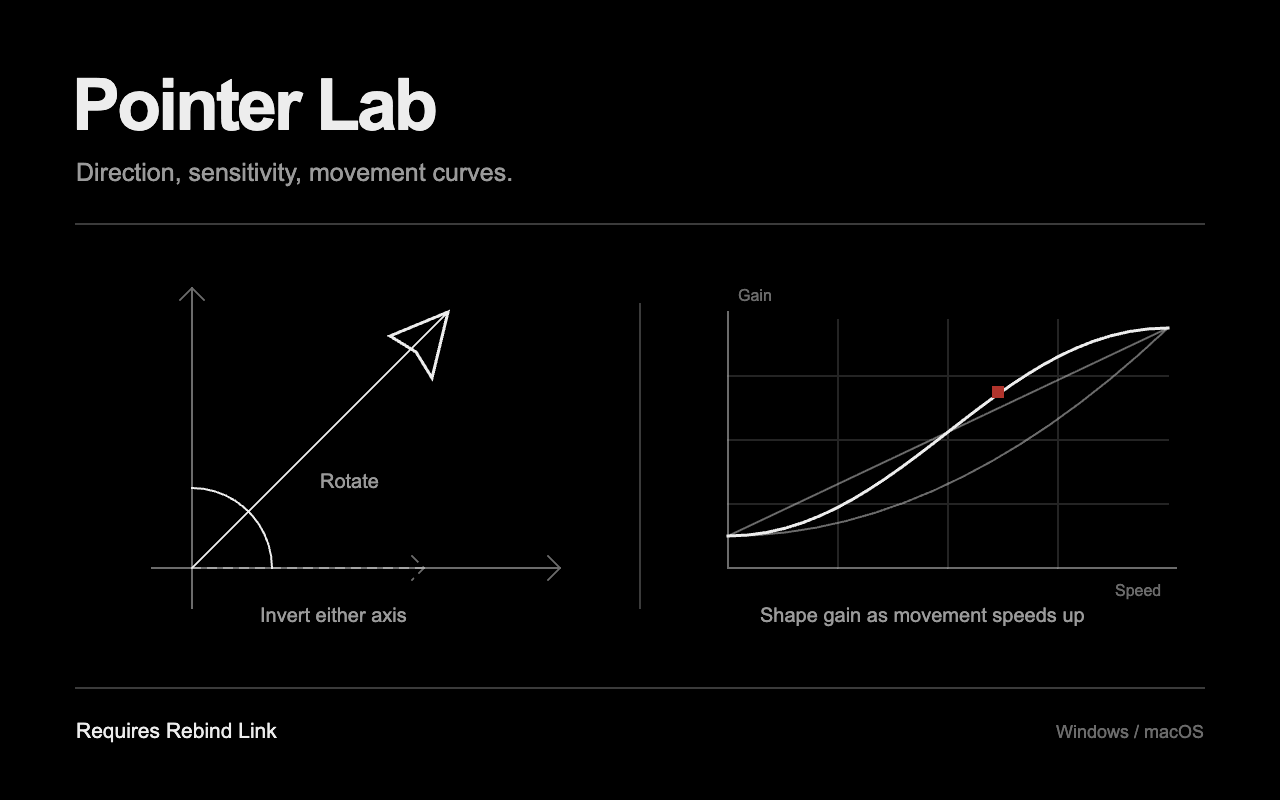
Invert either mouse axis, rotate movement, and adjust horizontal and vertical sensitivity independently. An optional speed curve changes gain between slow and fast movement. All controls share one settings panel.

Setup

Requires Rebind Engine 3.5.0 or newer on Windows or macOS, with an authenticated Rebind Link and the mouse forwarded through hardware capture. Software mode and Linux are not supported. See platform setup.

Open main.luau in Rebind and use its Options panel. Start the script from the editor toolbar, or run rebind run library/pointer-lab from the repository root. Defaults preserve movement direction and use 1x sensitivity with the curve off. Settings save automatically and apply while running, without a restart.

Press F8 to bypass or re-enable the transforms. The Apply transforms (F8) switch shows the same state. F8 is reserved while this script runs; other keys, mouse buttons, and scrolling are not changed by Pointer Lab.

Tune movement

  1. Set Invert horizontal input or Invert vertical input if needed.
  2. Adjust Rotation (clockwise). With inversion off, +90° turns right into down; -90° turns right into up. Inversion happens before rotation.
  3. Set Horizontal sensitivity and Vertical sensitivity from 0.1x to 4x. These scale the output axes after rotation, so horizontal always means the final left/right movement.
  4. Turn on Use a movement curve to reveal its controls. Choose Linear for an even ramp, Smooth for eased ends, or Quadratic for a slower initial change. Slow movement gain and Fast movement gain multiply both sensitivities. Set fast gain above slow gain for acceleration, or below it for deceleration. Equal gains give constant scaling.

Transition speed is where the curve reaches fast gain and stops increasing or decreasing. It is measured in raw mouse counts per millisecond, not screen pixels. A higher-DPI mouse reaches it with less physical movement. Start with the curve off, tune the two sensitivities, then enable and adjust the curve.

Use the panel's Reset to defaults to restore the original settings.

Stop and recovery

Turn Apply transforms (F8) off to pass original movement through. Stop the script in the editor, or press Ctrl+C in its rebind run terminal. To stop all scripts and release held input, press Left Ctrl + Left Alt + K.

Pointer Lab discards pending movement when bypassed or stopped. It never holds keys or buttons. Run only one movement-transform script at a time: a blocked movement event does not reach lower-priority scripts.

Timing and verification

Movement is combined until the next script tick, requested at 1,000 ticks per second. Curves use net displacement divided by actual elapsed tick time. This adds tick scheduling delay and is not a USB polling-rate or latency guarantee. Direction reversals inside one tick can cancel. Fractional output is retained between ticks so sensitivity below 1x does not discard small movements. Operating-system pointer settings still affect the emitted HID movement.

Source is prepared for hardware testing. Physical capture, cursor feel, and Link output have not been verified on Windows or macOS. Listing artwork is an original illustration, not a screenshot or evidence of execution.

Reviews

No reviews yet. Write a review in the app.

Source

Version 0.1.0 (current)

main.luau

local cfg = UI.Schema({
  enabled = UI.Toggle(true, {
    label = "Apply transforms (F8)",
    group = "Pointer Lab",
    tooltip = "Turn off to pass original movement through. F8 toggles this setting.",
  }),
  invert_x = UI.Toggle(false, {
    label = "Invert horizontal input",
    group = "Direction",
    tooltip = "Reverse the mouse X axis before rotation.",
  }),
  invert_y = UI.Toggle(false, {
    label = "Invert vertical input",
    group = "Direction",
    tooltip = "Reverse the mouse Y axis before rotation.",
  }),
  rotation = UI.Slider(0, {
    label = "Rotation (clockwise)",
    group = "Direction",
    min = -180,
    max = 180,
    step = 1,
    suffix = "°",
    tooltip = "With inversion off, +90 degrees turns rightward input downward.",
  }),
  sensitivity_x = UI.Slider(1, {
    label = "Horizontal sensitivity",
    group = "Sensitivity",
    min = 0.1,
    max = 4,
    step = 0.05,
    suffix = "x",
    tooltip = "Scale the output X axis after rotation. 1x leaves it unchanged.",
  }),
  sensitivity_y = UI.Slider(1, {
    label = "Vertical sensitivity",
    group = "Sensitivity",
    min = 0.1,
    max = 4,
    step = 0.05,
    suffix = "x",
    tooltip = "Scale the output Y axis after rotation. 1x leaves it unchanged.",
  }),
  curve_enabled = UI.Toggle(false, {
    label = "Use a movement curve",
    group = "Movement curve",
    tooltip = "Vary gain with movement speed. Off keeps sensitivity constant.",
  }),
  curve = UI.Select("Smooth", { "Linear", "Smooth", "Quadratic" }, {
    label = "Curve shape",
    group = "Movement curve",
    showIf = "curve_enabled",
    tooltip = "Linear changes evenly. Smooth eases at both ends. Quadratic changes slowly at first.",
  }),
  slow_gain = UI.Slider(0.5, {
    label = "Slow movement gain",
    group = "Movement curve",
    showIf = "curve_enabled",
    min = 0.1,
    max = 3,
    step = 0.05,
    suffix = "x",
    tooltip = "Gain near rest, multiplied by each axis sensitivity.",
  }),
  fast_gain = UI.Slider(2, {
    label = "Fast movement gain",
    group = "Movement curve",
    showIf = "curve_enabled",
    min = 0.1,
    max = 3,
    step = 0.05,
    suffix = "x",
    tooltip = "Gain at and above the transition speed. Set below slow gain to decelerate.",
  }),
  transition_speed = UI.Slider(10, {
    label = "Transition speed",
    group = "Movement curve",
    showIf = "curve_enabled",
    min = 0.5,
    max = 50,
    step = 0.5,
    suffix = " counts/ms",
    tooltip = "Raw movement speed at which fast gain is reached. Mouse DPI affects this value.",
  }),
})

local pending_x, pending_y = 0, 0
local remainder_x, remainder_y = 0, 0

local function reset_motion()
  pending_x, pending_y = 0, 0
  remainder_x, remainder_y = 0, 0
end

-- saved UI values are not range-checked by the SDK.
local function number_setting(value, default, low, high)
  if type(value) ~= "number" or value ~= value then
    return default
  end
  return math.max(low, math.min(high, value))
end

Bind("F8", function()
  cfg.enabled = not cfg.enabled
  reset_motion()
  UI.Notify(cfg.enabled and "Pointer Lab enabled." or "Pointer Lab bypassed.")
end)

function OnMove(dx, dy)
  if cfg.enabled ~= true then
    reset_motion()
    return true
  end
  -- combine separately delivered X/Y events before measuring speed or rotating.
  pending_x = pending_x + dx
  pending_y = pending_y + dy
  return false
end

function OnTick(dt_ms)
  if cfg.enabled ~= true then
    reset_motion()
    return
  end
  local dx, dy = pending_x, pending_y
  pending_x, pending_y = 0, 0
  if dx == 0 and dy == 0 then
    return
  end

  local gain = 1
  if cfg.curve_enabled == true then
    local elapsed = dt_ms > 0 and dt_ms or 1
    local speed = math.sqrt(dx * dx + dy * dy) / elapsed
    local transition = number_setting(cfg.transition_speed, 10, 0.5, 50)
    local t = math.min(speed / transition, 1)
    if cfg.curve == "Smooth" then
      t = t * t * (3 - 2 * t)
    elseif cfg.curve == "Quadratic" then
      t = t * t
    end
    local slow = number_setting(cfg.slow_gain, 0.5, 0.1, 3)
    local fast = number_setting(cfg.fast_gain, 2, 0.1, 3)
    gain = slow + (fast - slow) * t
  end

  if cfg.invert_x == true then
    dx = -dx
  end
  if cfg.invert_y == true then
    dy = -dy
  end
  local angle = math.rad(number_setting(cfg.rotation, 0, -180, 180))
  local c, s = math.cos(angle), math.sin(angle)
  local x = (dx * c - dy * s)
      * number_setting(cfg.sensitivity_x, 1, 0.1, 4)
      * gain
    + remainder_x
  local y = (dx * s + dy * c)
      * number_setting(cfg.sensitivity_y, 1, 0.1, 4)
      * gain
    + remainder_y
  local out_x, out_y = math.floor(x + 0.5), math.floor(y + 0.5)
  -- HID.Move accepts integers; carry fractions instead of losing slow movement.
  remainder_x, remainder_y = x - out_x, y - out_y
  if out_x ~= 0 or out_y ~= 0 then
    HID.Move(out_x, out_y)
  end
end

function OnStop()
  reset_motion()
end

function OnBlur()
  reset_motion()
end

1 file without text previews